
Multiplatform Bluetooth® Mesh Library
The multiplatform Bluetooth® Mesh API for iOS, Android, Web, Windows, Linux and macOS.
As app developers, we have worked with every major Bluetooth® Mesh library available in 2025. None of them met our requirements for features, ease of use, and documentation. We found it difficult to get started, to debug issues, and to create apps that run on multiple platforms; every additional platform meant learning new concepts, APIs, and corner cases. Above all, there was no well-maintained library for web applications or for servers and gateways running Linux.
After completing two large projects using existing technology, we decided to build our own. The BluKo Mesh Library is designed for ease of use, whether you are building mobile apps for iOS and Android or software for Linux-based systems such as gateways and wall panels.
A unique feature is the ability to include this library in a browser-based application using Web Bluetooth. This allows you to create web apps that interact directly with Bluetooth® Mesh networks.
Target Platforms
- Android using Kotlin
- iOS and iPadOS using Swift
- Web browsers using TypeScript or JavaScript
- Linux/Windows/macOS using Node.js or Java/JVM
This library is not designed for embedded systems; it targets mobile and desktop apps, powerful gateways, or even server systems.
Key Features
- Single codebase and single API across all supported platforms.
- Supports native, modern async APIs – no need to manage callbacks.
- Integrates with native platform features for bearer, storage, and logging.
- Created by app developers for app developers – no cryptic, low-level APIs.
- Supports all Bluetooth® Mesh 1.0.1 features like provisioning, GATT proxies, groups, and all specified models.
- Includes extensive documentation and sample code to get you started in hours instead of weeks.
One API, Many Languages
The same concepts, the same call order, the same names – written the way each language expects.
Provision a Device
Open the network, let the device identify itself, provision it, and connect to it as a proxy.
Kotlin
val network = MeshNetwork.getOrCreateSingle(storage, logger, acknowledgedMessageTimeout = 30.seconds)
val networkKey = network.networkKeys.getStored().first()

val provisioningBearer = GattProvisioningProxyBearer.fromScan(logger = logger)
val device = network.identifyDevice(provisioningBearer, provisioningBearer.serviceData, attentionDuration = 5.seconds)
val node = device.provision(networkKey, name = "Desk Lamp")

network.connectToProvisionedNode(provisioningBearer, node)
TypeScript / JavaScript
const network = await MeshNetwork.getOrCreateSingle(storage, logger, 30_000n)
const [networkKey] = (await network.networkKeys.getStored()).asJsReadonlySetView()

const provisioningBearer = await GattProvisioningProxyBearer.fromScan(logger)
const device = await network.identifyDevice(provisioningBearer, provisioningBearer.serviceData, 5_000n)
const node = await device.provision(networkKey, 'Desk Lamp')

await network.connectToProvisionedNode(provisioningBearer, node, 60_000n)
Swift
let network = try await MeshNetwork.getOrCreateSingle(
    storage: storage, logger: logger, acknowledgedMessageTimeoutMillis: 30_000)
let networkKey = try await network.networkKeys.getStored().first!

let provisioningBearer = try await GattProvisioningProxyBearer.fromScan(logger: logger)
let device = try await network.identifyDevice(
    bearer: provisioningBearer, provisioningServiceData: provisioningBearer.serviceData,
    attentionDurationMillis: 5_000)
let node = try await device.provision(
    networkKey: networkKey, name: "Desk Lamp",
    authentication: messageio.OobAuthentication.None.shared, oobPublicKey: nil)

_ = try await network.connectToProvisionedNode(
    provisioningBearer: provisioningBearer, node: node, timeoutMillis: 60_000,
    reuseProvisioningConnection: bearer.ProvisioningConnectionReuse.Never.shared)
Java (blocking)
var network = MeshNetwork.getOrCreateSingleBlocking(storage, logger, 30_000L);
var networkKey = network.getNetworkKeys().getStoredBlocking().iterator().next();

var provisioningBearer = GattProvisioningProxyBearer.fromScanBlocking(logger);
var device = network.identifyDeviceBlocking(provisioningBearer, provisioningBearer.getServiceData(), 5_000L);
var node = device.provisionBlocking(networkKey, "Desk Lamp", OobAuthentication.None.INSTANCE, null);

network.connectToProvisionedNodeBlocking(provisioningBearer, node, 60_000L, ProvisioningConnectionReuse.Never.INSTANCE);
Java (async)
MeshNetwork.getOrCreateSingleAsync(storage, logger, 30_000L).thenCompose(network ->
    network.getNetworkKeys().getStoredAsync().thenApply(networkKeys -> networkKeys.iterator().next()).thenCompose(networkKey ->
        GattProvisioningProxyBearer.fromScanAsync(logger).thenCompose(provisioningBearer ->
            network.identifyDeviceAsync(provisioningBearer, provisioningBearer.getServiceData(), 5_000L)
                .thenCompose(device -> device.provisionAsync(networkKey, "Desk Lamp", OobAuthentication.None.INSTANCE, null))
                .thenCompose(node ->
                    network.connectToProvisionedNodeAsync(provisioningBearer, node, 60_000L, ProvisioningConnectionReuse.Never.INSTANCE)))));
Configure a Node
Hand the node an application key, create a group, bind the key to a model, and subscribe the model to the group.
Kotlin
val appKey = network.applicationKeys.create(boundNetworkKey = networkKey, name = "Lighting")
node.applicationKeys.add(appKey)

val livingRoom = network.groups.create(name = "Living Room")

val elementModels = node.elements[0u].models.getStored().orEmpty()
val lamp = elementModels.filterIsInstance<LightLightnessServerModel>().single()
lamp.boundApplicationKeys.bind(appKey)
lamp.subscriptions.add(livingRoom)
TypeScript / JavaScript
const appKey = await network.applicationKeys.create(networkKey, 'Lighting')
await node.applicationKeys.add(appKey)

const livingRoom = await network.groups.create('Living Room')

const elementModels = await node.elements.get(0).models.getStored()
const lamp = elementModels!.asJsReadonlyArrayView()
    .find((model): model is LightLightnessServerModel => model instanceof LightLightnessServerModel)!
await lamp.boundApplicationKeys.bind(appKey)
await lamp.subscriptions.add(livingRoom)
Swift
let appKey = try await network.applicationKeys.create(boundNetworkKey: networkKey, name: "Lighting")
try await node.applicationKeys.add(applicationKey: appKey, ttl: messageio.Ttl.Default.shared)

let livingRoom = try await network.groups.create(name: "Living Room")

let elementModels = try await node.elements[0].models.getStored() ?? []
let lamp = elementModels.compactMap { $0 as? models.LightLightnessServerModel }.first!
try await lamp.boundApplicationKeys.bind(applicationKey: appKey, ttl: messageio.Ttl.Default.shared)
try await lamp.subscriptions.add(destination: livingRoom, ttl: messageio.Ttl.Default.shared)
Java (blocking)
var appKey = network.getApplicationKeys().createBlocking(networkKey, "Lighting");
node.getApplicationKeys().addBlocking(appKey, Ttl.Default.INSTANCE);

var livingRoom = network.getGroups().createBlocking("Living Room");

var elementModels = node.getElements().get((byte) 0).getModels().getStoredBlocking();
var lamp = elementModels.stream()
    .filter(LightLightnessServerModel.class::isInstance).map(LightLightnessServerModel.class::cast)
    .findFirst().orElseThrow();
lamp.getBoundApplicationKeys().bindBlocking(appKey, Ttl.Default.INSTANCE);
lamp.getSubscriptions().addBlocking(livingRoom, Ttl.Default.INSTANCE);
Java (async)
network.getApplicationKeys().createAsync(networkKey, "Lighting").thenCompose(appKey ->
    node.getApplicationKeys().addAsync(appKey, Ttl.Default.INSTANCE)
        .thenCompose(added -> network.getGroups().createAsync("Living Room")).thenCompose(livingRoom ->
            node.getElements().get((byte) 0).getModels().getStoredAsync()
                .thenApply(elementModels -> elementModels.stream()
                    .filter(LightLightnessServerModel.class::isInstance).map(LightLightnessServerModel.class::cast)
                    .findFirst().orElseThrow())
                .thenCompose(lamp -> lamp.getBoundApplicationKeys().bindAsync(appKey, Ttl.Default.INSTANCE)
                    .thenCompose(bound -> lamp.getSubscriptions().addAsync(livingRoom, Ttl.Default.INSTANCE)))));
Control a Model
Every setter returns the state the node reports back, typed for that model.
Kotlin
val status = lamp.lightnessActual.setAcknowledged(appKey, lightness = 0x8000u)
println("Lamp is at ${status.presentLightness}")
TypeScript / JavaScript
const status = await lamp.lightnessActual.setAcknowledged(appKey, ushort(0x8000))
console.log(`Lamp is at ${toNumber(status.presentLightness)}`)
Swift
let status = try await lamp.lightnessActual.setAcknowledged(
    applicationKey: appKey, lightness: 0x8000, transition: nil, ttl: messageio.Ttl.Default.shared)
print("Lamp is at \(status.presentLightness)")
Java (blocking)
var status = lamp.getLightnessActual().setAcknowledgedBlocking(appKey, ushort(0x8000), null, Ttl.Default.INSTANCE);
IO.println("Lamp is at " + toInt(status.getPresentLightness()));
Java (async)
lamp.getLightnessActual().setAcknowledgedAsync(appKey, ushort(0x8000), null, Ttl.Default.INSTANCE)
    .thenAccept(status -> IO.println("Lamp is at " + toInt(status.getPresentLightness())));
Read a Sensor
Ask a sensor for a property and get exactly that property back, decoded and typed, including the spec’s “unknown” sentinels.
Kotlin
val temperature = sensor.forProperty(PresentAmbientTemperature).value.request(appKey)

when (val celsius = temperature.characteristic.celsius) {
    is Known -> println("${celsius.value} °C")
    Unknown -> println("The sensor has no reading")
}
TypeScript / JavaScript
const temperature = await sensor.forProperty(PropertyValue.PresentAmbientTemperature.Property).value.request(appKey)

const celsius = temperature.characteristic.celsius
console.log(celsius instanceof Reading.Known ? `${celsius.value} °C` : 'The sensor has no reading')
Swift
typealias properties = ExportedKotlinPackages.net.bluko.mesh.properties

let temperature = try await sensor
    .forProperty(property: properties.PropertyValue.PresentAmbientTemperature.Property.shared)
    .value.request(applicationKey: appKey, ttl: messageio.Ttl.Default.shared)

if let celsius = temperature.characteristic.celsius as? properties.Reading.Known<Float> {
    print("\(celsius.value) °C")
} else {
    print("The sensor has no reading")
}
Java (blocking)
var temperature = sensor.forProperty(PropertyValue.PresentAmbientTemperature.Property)
    .getValue().requestBlocking(appKey, Ttl.Default.INSTANCE);

if (temperature.getCharacteristic().getCelsius() instanceof Reading.Known<Float> celsius) {
    IO.println(celsius.getValue() + " °C");
} else {
    IO.println("The sensor has no reading");
}
Java (async)
sensor.forProperty(PropertyValue.PresentAmbientTemperature.Property)
    .getValue().requestAsync(appKey, Ttl.Default.INSTANCE)
    .thenAccept(temperature -> IO.println(
        temperature.getCharacteristic().getCelsius() instanceof Reading.Known<Float> celsius
            ? celsius.getValue() + " °C"
            : "The sensor has no reading"));
Follow Live Updates
Incoming messages and stored state arrive through whatever your language already uses for a stream of values – no callbacks to register and no listeners to unregister.
Kotlin
lamp.lightnessActual.statuses.collect { status ->
    println("Lamp changed to ${status.presentLightness}")
}
TypeScript / JavaScript
for await (const status of lamp.lightnessActual.statuses) {
    console.log(`Lamp changed to ${toNumber(status.presentLightness)}`)
}
Swift
for try await status in lamp.lightnessActual.statuses.asAsyncSequence() {
    print("Lamp changed to \(status.presentLightness)")
}
Java (blocking)
try (var statuses = lamp.getLightnessActual().statusesBlocking()) {
    statuses.forEach(status -> IO.println("Lamp changed to " + toInt(status.getPresentLightness())));
}
Java (async)
JdkFlowAdapter.flowPublisherToFlux(lamp.getLightnessActual().statusesPublisher())
    .subscribe(status -> IO.println("Lamp changed to " + toInt(status.getPresentLightness())));
Import and Export a Network
Networks move in and out as Mesh Configuration Database JSON, the format other provisioners read and write.
Kotlin
val networkId = MeshIo.importFromJson(storage, json, logger = logger)
val exportedJson = MeshIo.exportToJson(storage, network)
TypeScript / JavaScript
const networkId = await MeshIo.importFromJson(logger, storage, json)
const exportedJson = await MeshIo.exportToJson(storage, network)
Swift
let networkId = try await MeshIo.shared.importFromJson(logger, storage: storage, cdbJson: json)
let exportedJson = try await MeshIo.shared.exportToJson(storage: storage, network: network)
Java (blocking)
var networkId = MeshIo.importFromJsonBlocking(logger, storage, json);
var exportedJson = MeshIo.exportToJsonBlocking(storage, network);
Java (async)
MeshIo.importFromJsonAsync(logger, storage, json)
    .thenAccept(networkId -> IO.println("Imported " + networkId));
MeshIo.exportToJsonAsync(storage, network)
    .thenAccept(exportedJson -> IO.println(exportedJson));
Compatibility
| Spec | Version | Level of Support |
|---|---|---|
| Mesh Protocol | 1.0.1 | full |
| Mesh Protocol | 1.1.1 | partial |
| Mesh Model | 1.0.1 | full |
| Mesh Model | 1.1.1 | partial |
| Device Properties | 2026-02-04 | full |
| Mesh Configuration Database Profile | 1.0.1 | full |
| Ambient Light Sensor NLC Profile | 1.0.1 | full |
| Basic Lightness Controller NLC Profile | 1.0.1 | full |
| Basic Scene Selector NLC Profile | 1.0.1 | full |
| Dimming Control NLC Profile | 1.0.1 | full |
| Energy Monitor NLC Profile | 1.0.1 | full |
| Occupancy Sensor NLC Profile | 1.0.1 | full |
Mesh Features
- Provisioning with and without OOB (input, output, static) for increased security
- Configuration (manage keys, set up publish/subscribe, heartbeats, relay, proxy, friend, etc.)
- Send and receive client and server messages
- All address types like unicast addresses, groups, and virtual labels
- Scenes with store and recall
- Proxy filter setup
- IV Index update and secure network beacons (SNB)
- Import and export networks using the Mesh Configuration Database Profile
- Custom native implementations of bearers, storage, and logging possible
Will be added on demand:
- Key Refresh Procedure
Architecture
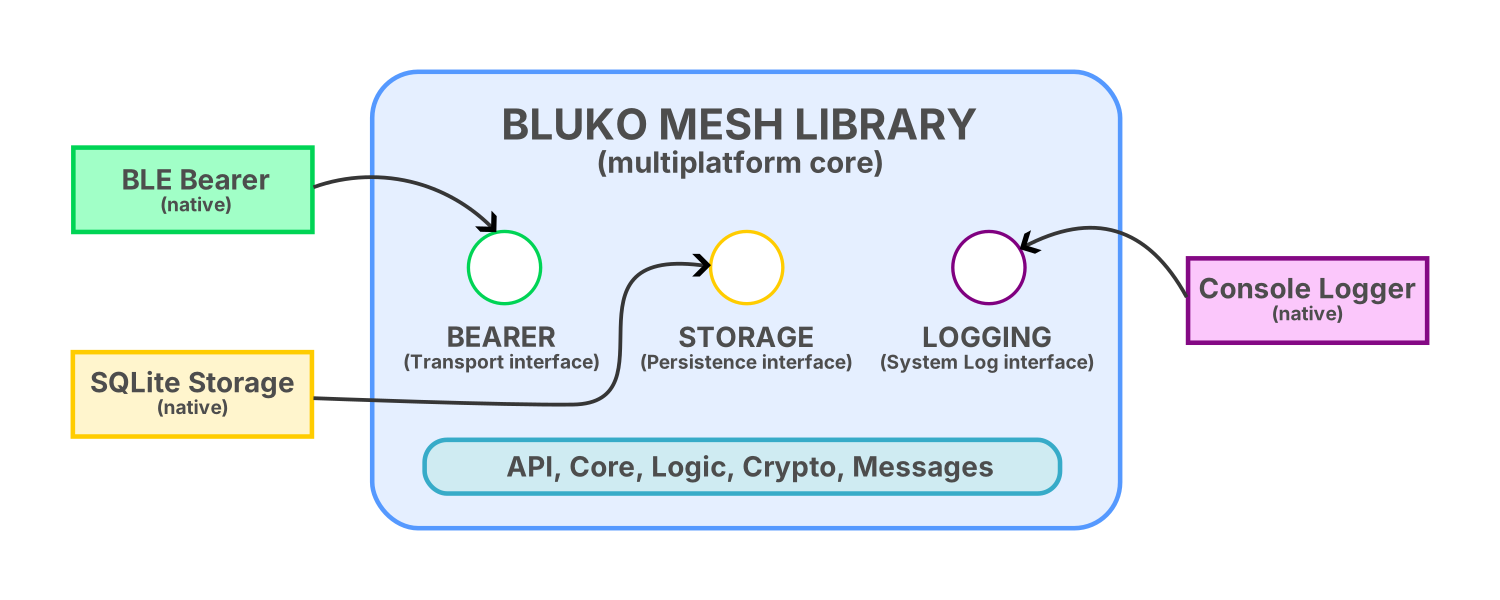
What many developers don’t know is that Bluetooth® Mesh itself is “just software” sitting on top of Bluetooth® LE. While Bluetooth® LE needs an actual hardware chip plus native APIs, Bluetooth® Mesh just uses the existing hardware Bluetooth® LE as a bearer.
We used this to our advantage: all platform-agnostic code is written once and can be used from various programming languages on various operating systems.
Since the Bluetooth® Mesh code needs to interact with the target platform code eventually, there are a couple of native components to fill the gaps. Those components are decoupled using strict and stable interfaces, making it easy for you to implement your own. Alternatively, you can also use one of the many components we provide directly.
Pluggable Bearer ★
The bearer creates a point-to-point GATT connection to unprovisioned devices and proxy nodes. We ship implementations for Core Bluetooth (iOS, iPadOS, macOS), Android, Web Bluetooth (Chrome, Chromium) and JVM (Linux, Windows, macOS). Advertising bearers are also supported, but need to be implemented manually.
Pluggable Storage ★
During provisioning, a lot of data about the network and its nodes is generated. That data is stored in the central device database (CDB) and needs to be available to your application code.
The data may be stored in plain text files, in a local database, on a remote server, or in any other way. We provide ready-made implementations for local SQLite storage on all supported platforms, as well as a direct integration with the BluKo Mesh Synchronization infrastructure. You may also provide custom storage implementations if needed.
Pluggable Logging ★
Integrate your app’s own logging with the logging generated by the library. We recommend implementing the logging interface yourself to integrate optimally with your app, but basic debugging versions as well as an SLF4J implementation are provided.
Supported Bluetooth® Mesh Models
All models of the Bluetooth® Mesh model specification 1.0.1 are supported, as well as some models addded in 1.1. This includes (but is not limited to):
- All generic models like on/off, level, power, battery, location and their setup servers.
- All time and scenes models like time, scene, scheduler and their setup servers.
- All sensor models including setup server and all device property IDs.
- All lighting models like lightness, CTL, HSL, xyL, LC and their setup servers.
FAQ
1. Can I use the BluKo Mesh Library inside an Electron desktop app?
Yes, that is possible by using the TypeScript version together with a Node.js Bluetooth® LE bearer.
2. Why would I want to run a Bluetooth® Mesh stack on a server?
Good question. Using the BluKo Mesh Library on a server (or in the cloud) allows you to extend the mesh network beyond the physical location where the nodes are commissioned. For example, you can forward all Bluetooth® LE advertising packets over a WebSocket, bridging the physical mesh network with virtual nodes on a server. That is basically Bluetooth Mesh over IP, and it actually works very well by dramatically reducing the complexity of the gateways, by making it a “dumb” bridge.
3. What are the advantages of using a multi-platform Bluetooth® Mesh library?
If you create an app that targets more than one platform or operating system, it will lower the costs and time to market because:
- developers do not need to learn multiple concepts and multiple APIs.
- developers know that all features are available equally on all platforms.
- developers can trust that error handling, encoding, decoding, etc., work the same on all platforms.
Additionally, you gain the flexibility to use Kotlin Multiplatform code for everything or only pick it where it makes the most sense. e.g.,
- an iOS app with a native SwiftUI user interface using the BluKo Mesh Library for communication
- or a Kotlin Multiplatform app using the same code for iOS and Android all the way through
- a Bluetooth® Mesh app running inside a browser, maybe even downloaded from one of the mesh devices or a gateway
- a Linux gateway that is part of the mesh network, performing protocol translation to MQTT, Modbus, etc.
4. Can I import and export the Central DB JSON?
Yes, the BluKo Mesh Library is compatible with the Mesh Configuration Database Profile as specified by the Bluetooth® SIG. However, for a production app, we do not recommend manual export/import of the CDB as it is prone to errors. Instead, consider using BluKo Mesh Sync, which will transparently synchronize the CDB with multiple devices using a reliable, offline-first 2-way sync engine. If you use our library, it only takes one line of code to add synchronization.
Availability
This library is still under development, with a first public version planned for 2026. Let us know if you are interested, and we will schedule a demo and talk you through the current state of development.
